RefCheck User Manual
Version: 2026.04 | Target Users: University professors, researchers, academic authors, journal editors, graduate students (Master's/PhD), and students working on research projects writing.
I. Introduction & Preparation
RefCheck is an automated academic reference (citation) validation tool designed to help users quickly verify the consistency between their citations/references and international academic databases (such as Crossref, Google Scholar, etc.), degree theses, dissertations, published books, and library databases. It identifies records that require further manual inspection, significantly increasing workflow efficiency.
The system is particularly valuable in an era of widespread AI-assisted writing, where generative AI tools such as ChatGPT can produce plausible-sounding but entirely fictitious citations — a phenomenon known as AI hallucination. RefCheck helps researchers, editors, and supervisors rapidly screen an entire reference list and flag any entries that cannot be verified in authoritative databases.
1. Supported File Formats
- TXT (Plain text) — fastest processing
- DOCX (Microsoft Word)
- PDF (Searchable text PDF)
- Direct Paste (Plain text in browser)
2. Pre-operation Precautions
- File Size Recommendations: While there is no strict limit on article length, if your paper is very long or has a complex layout that prevents the program from successfully extracting citations, we recommend manually copying and uploading only the "References" section to significantly improve processing speed.
- Data Retention Policy: The system does not store any uploaded data. Please do not close your browser during use. Once the browser is closed, the data will be lost; ensure you download and save your verification results.
- Manual Verification: For references "Not Found" after detection, the system provides direct links to Google Scholar and Google Search for quick manual checking. Always perform a manual verification to ensure accuracy.
- Results for Reference Only: Please note that perfectly valid citations may occasionally go undetected due to database connection issues. Conversely, minor typos or formatting issues may lead to a "Not Found" status.
- Detection of Fabricated References: Note that the system may not catch all fabricated references. A fake citation might be flagged as "Ok" if its title is highly similar to an existing publication.
II. Step-by-Step Instructions
Step 1: Upload & Input
After entering the system, you can choose one of two methods to input your references:
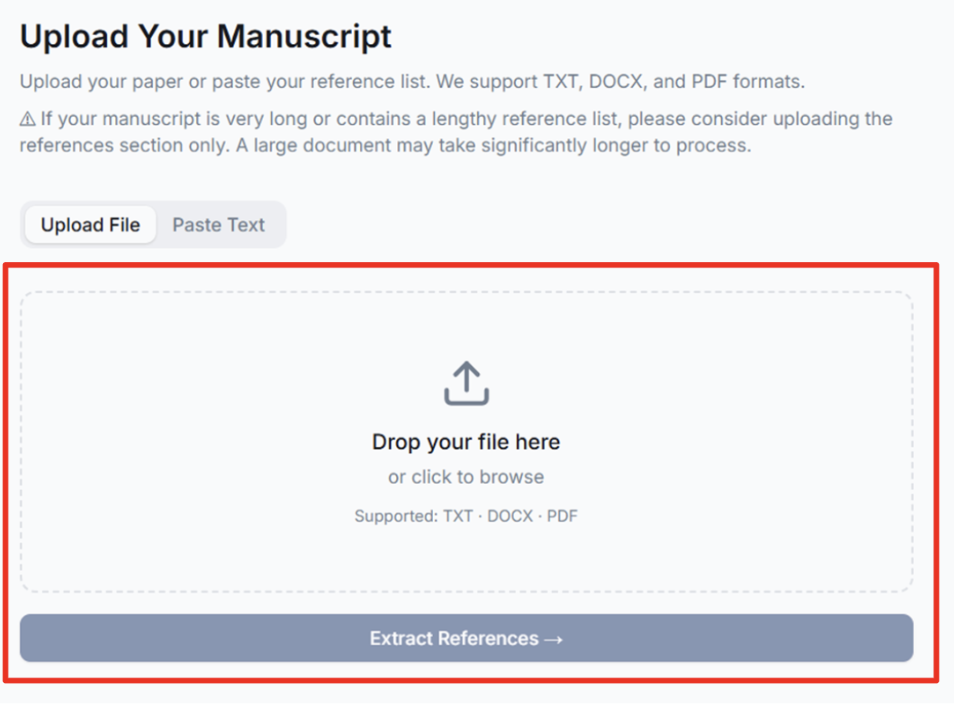
- Upload File: Drag and drop your file into the box or click to browse.
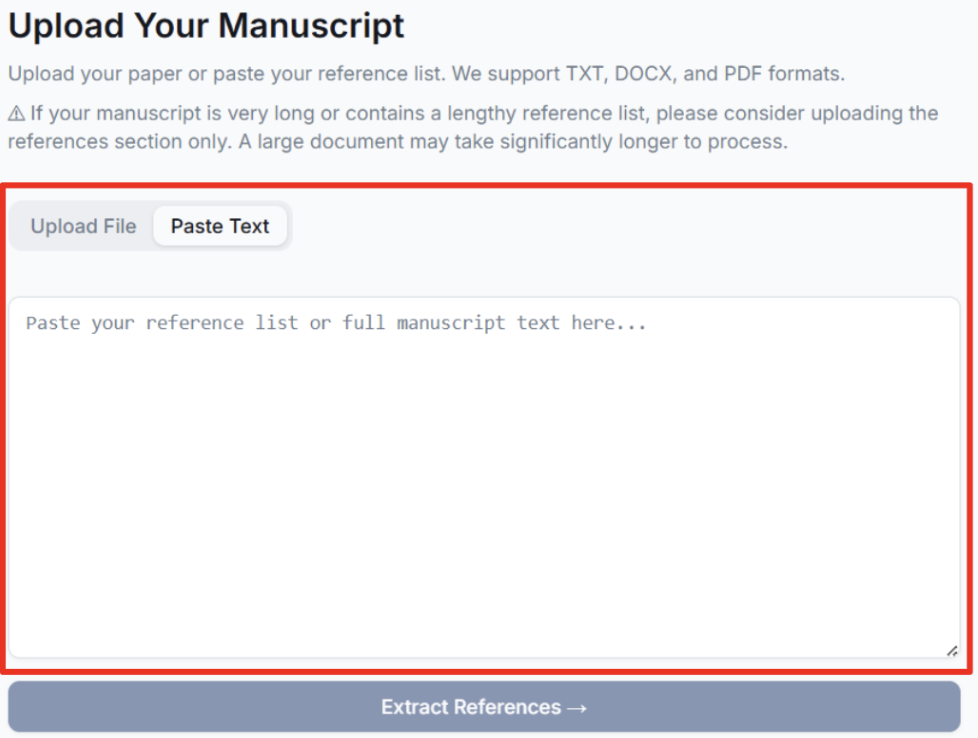
- Paste Text: Switch to the "Paste Text" tab and paste your reference list directly.
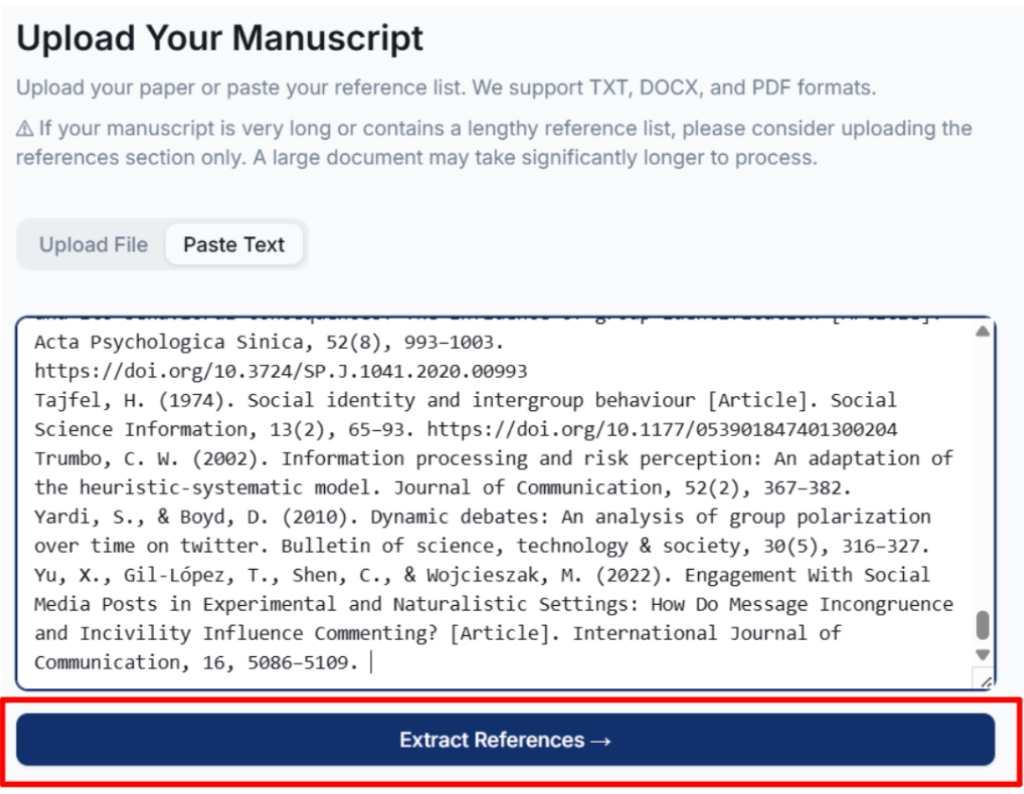
Key Action: Once confirmed, click the dark blue [Extract References →] button at the bottom.
Step 2: Reference Extraction
The system will automatically identify individual references from your file or text.
- Review List: The screen will display "XX references detected." Please check if the count is correct.
- If correct: Click [Correct — Start Verification] to begin.
- If incorrect: Click [Not Correct — Re-upload] to try again.
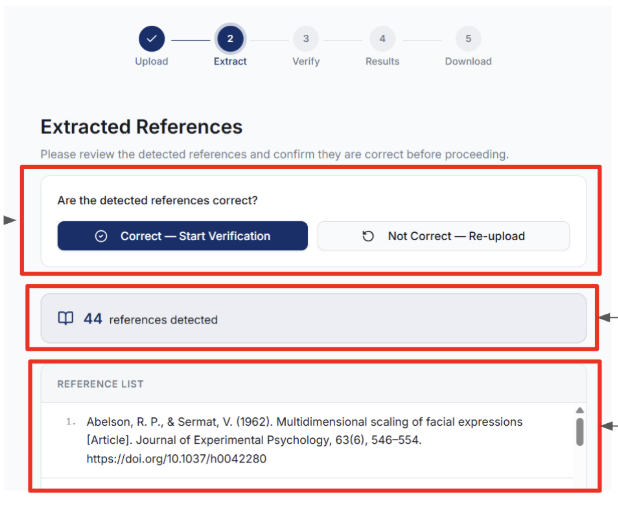
Step 3: Automated Verification
In this phase, the system matches each entry against global databases.
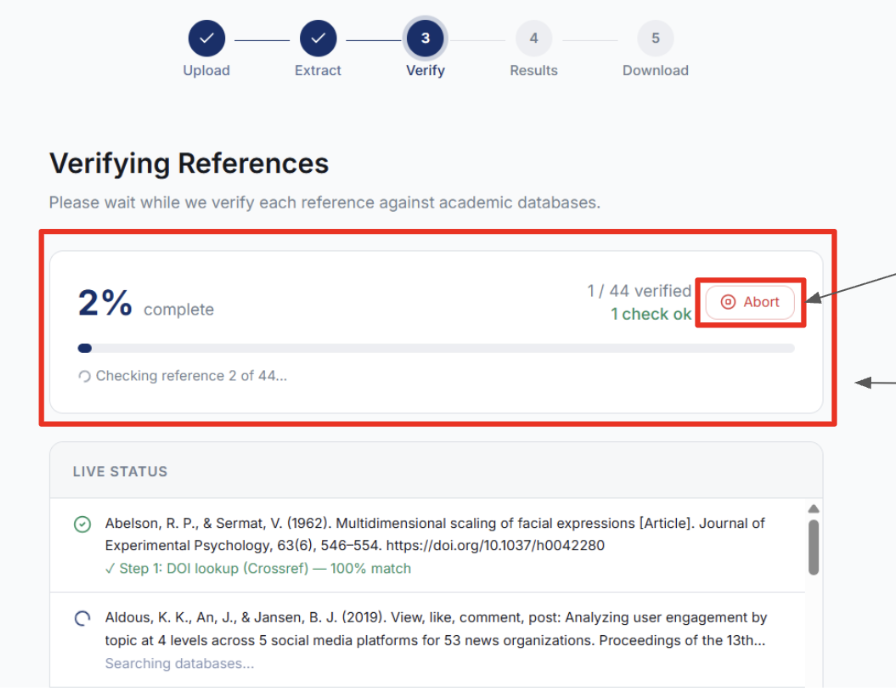
- Live Status: You can monitor the progress of each reference (e.g., DOI lookup).
- Abort Function: You can stop the process at any time by clicking the [Abort] button in the top right corner.
- Note: Progress is shown as a percentage; please wait until it reaches 100% completion.
Step 4: Interpreting Results
Once verification is complete, a summary report is generated:
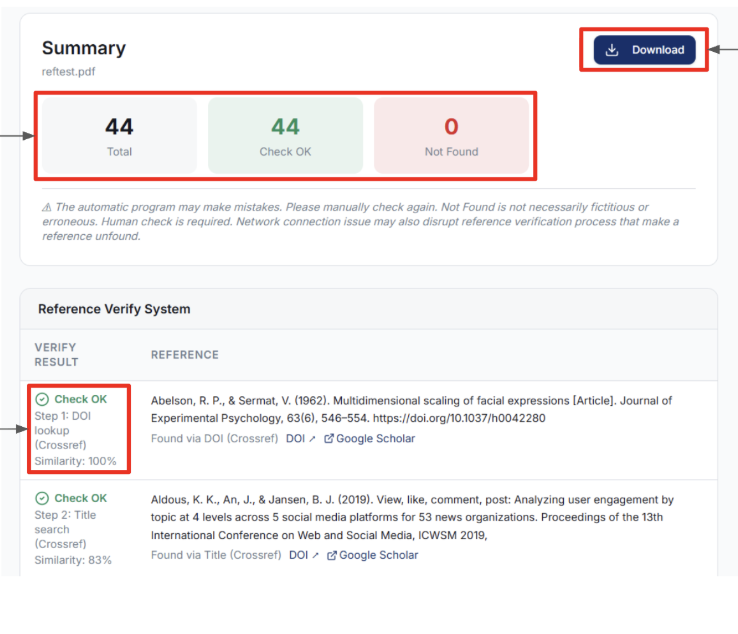
- Total: Total number of references processed.
- Check OK (Green): Successfully matched in the database.
- Not Found (Red): No match found (this does not necessarily mean the citation is wrong; it may be an unindexed journal or have unique formatting).
- Similarity: Displays the match percentage. 100% indicates a perfect match in the paper title.
Step 5: Download Reports
You can download verification reports in various formats for your records:
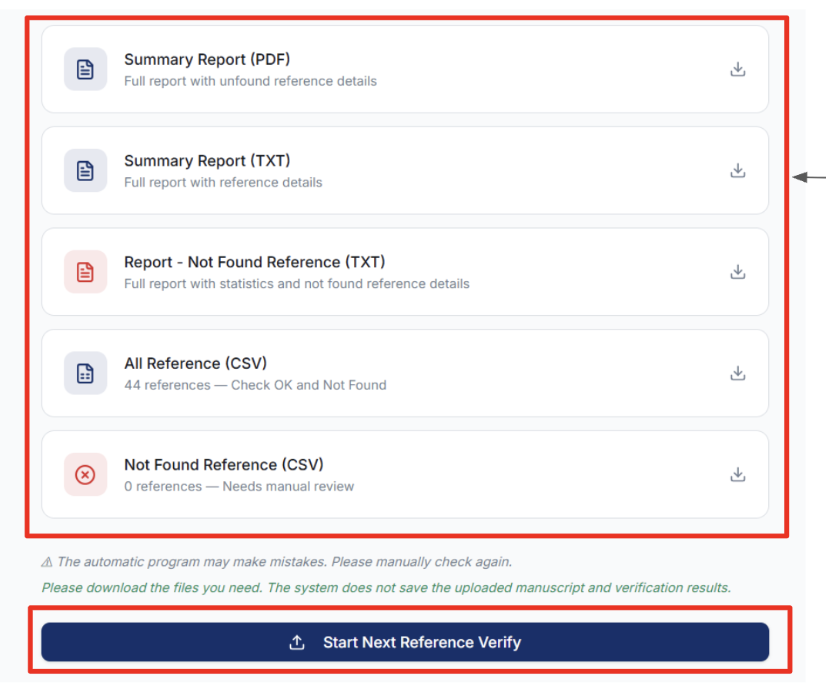
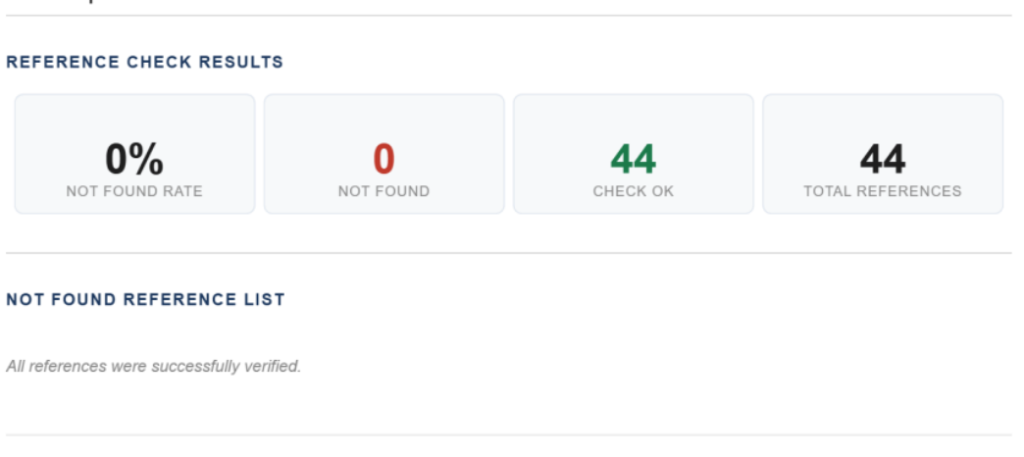
- Summary Report (PDF): A visual, concise report ideal for quick archiving.
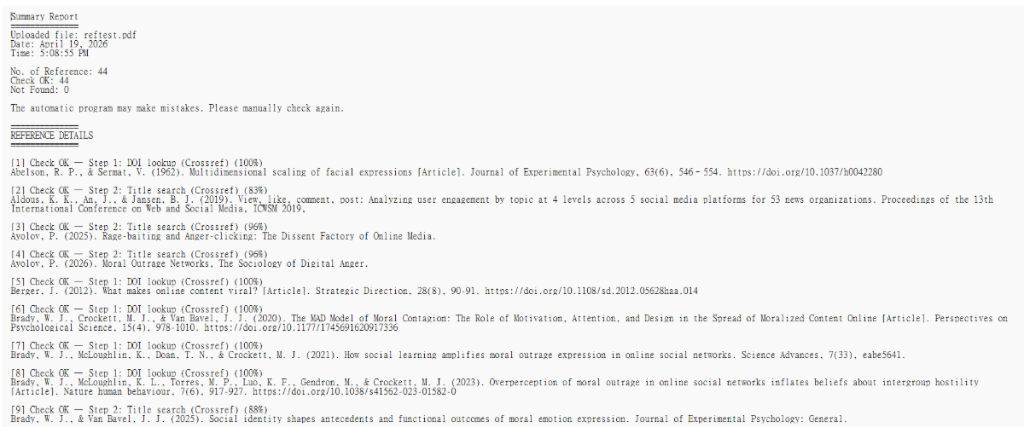
- Summary Report (TXT): A text file containing detailed comparison steps.
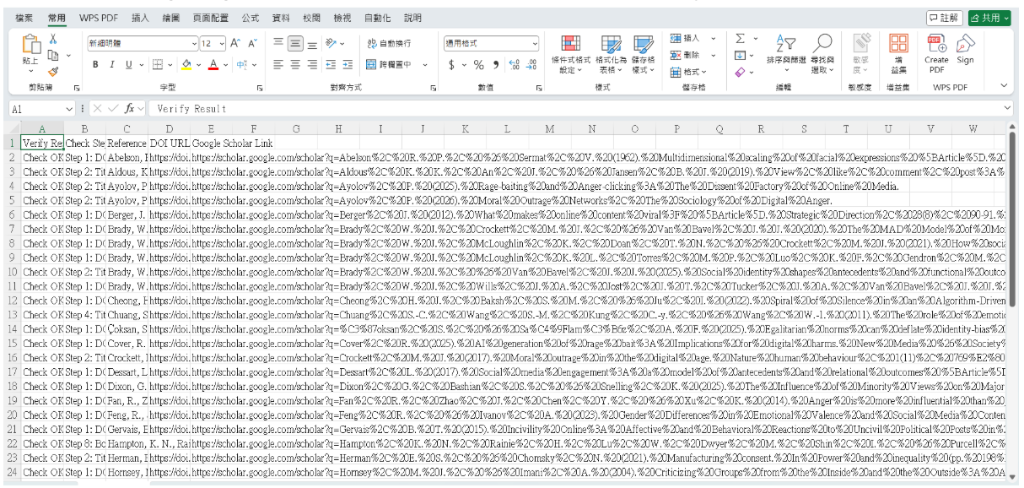
- All Reference (CSV): A comprehensive spreadsheet including DOIs, URLs, and Google Scholar links.
III. Input Tips & Common Pitfalls
Tip 1: Use Plain Text (TXT) for Fastest Processing
Among all input methods, pasting plain text or uploading a .txt file is the fastest. PDF and DOCX files require an extra file-parsing step before the AI can extract references — this adds processing time, especially for large documents. If your goal is speed, copy your reference list directly from Word or your PDF reader and paste it into the "Paste Text" tab.
⚡ Speed comparison (approximate):
- • Paste Text (references only) — fastest, near-instant extraction
- • TXT file upload — fast, minimal parsing overhead
- • DOCX file upload — moderate, requires Word-to-text conversion
- • PDF file upload — slowest, requires AI-assisted text extraction
Tip 2: Paste Reference Lists Only — Not Full Article Text
The "Paste Text" input is designed for reference lists, not general article content. If you paste a full paper body — including abstract, introduction, methodology, and discussion — the system's AI parser will attempt to locate and extract the reference section. This works in many cases, but it significantly increases the chance of parsing errors, especially when:
- The text contains many in-text citations (e.g., "(Smith, 2020)") that resemble reference entries
- The article body contains quoted works that are not in the reference list
- The reference section heading is missing or uses non-standard labels
❌ Wrong: Pasting full article body
"This study investigates social media use among university students (Lin, 2022). Previous research has shown that screen time correlates with anxiety (Wang et al., 2021). The methodology follows a mixed-methods approach..."
Result: Parser may mistake in-text citations or narrative sentences for references → extraction errors.
✅ Correct: Pasting reference list only
"Lin, C. (2022). Social media and student well-being. Journal of Youth Studies, 15(3), 45–60.
Wang, A., Chen, B., & Lee, D. (2021). Screen time and anxiety. Computers in Human Behavior, 120, Article 106756."
Result: Clean, accurate extraction of each individual reference.
Tip 3: Ensure Clear Separation Between References
Each reference entry must be clearly separated from the next. The parser uses line breaks, blank lines, and structural cues to identify where one reference ends and the next begins. When references run together without any separator, the system may incorrectly merge two or more entries into a single item — or split one long entry into multiple fragments.
❌ Wrong: No line breaks between references
Smith, J. (2021). AI and education. Journal of Learning, 10(2), 55–70. Brown, K. (2022). Deep learning in schools. Tech Review, 5(1), 12–25. Lee, M. (2023). ChatGPT in classrooms. EdTech Today, 8(4), 88–99.
Result: System may read this as one long reference, or split incorrectly.
✅ Correct: Each reference on its own line (or separated by blank line)
Smith, J. (2021). AI and education. Journal of Learning, 10(2), 55–70. Brown, K. (2022). Deep learning in schools. Tech Review, 5(1), 12–25. Lee, M. (2023). ChatGPT in classrooms. EdTech Today, 8(4), 88–99.
Result: Each reference is cleanly identified and extracted separately.
IV. Citation Format Examples & How They Are Processed
RefCheck supports a wide range of citation styles. Below are real-world examples showing how different formats are handled by the system. The key field extracted is always the article or book title, which is then used to search across databases.
APA (Journal Article)
Wang, C. C., & Lin, T. Z. (2024). Detecting AI-generated fictitious references in academic papers. Journal of Information Science, 50(3), 412–428. https://doi.org/10.1177/01655515231234567
Extracted: Title: "Detecting AI-generated fictitious references in academic papers"
Note: APA is the most reliably parsed format. The title appears between the year parenthesis and the journal name, making it easy to extract.
IEEE (Conference Paper)
C. C. Wang and T. Z. Lin, "Detecting AI hallucinations in citation lists," in Proc. IEEE Int. Conf. Artificial Intelligence, 2024, pp. 100–105.
Extracted: Title: "Detecting AI hallucinations in citation lists"
Note: IEEE format uses quotation marks around the title, which the parser uses as a reliable anchor for extraction.
Chicago / MLA (Humanities)
Wang, Chih-Chien. "Reference Verification in the Age of AI." Academic Integrity Quarterly 15, no. 2 (2024): 88–103.
Extracted: Title: "Reference Verification in the Age of AI"
Note: Titles in quotation marks are reliably detected. The parser handles both Chicago Notes-Bibliography and Author-Date styles.
APA (Book)
Smith, J. A. (2023). Academic writing in the digital age (3rd ed.). Oxford University Press.
Extracted: Title: "Academic writing in the digital age" → verified via Google Books / Open Library
Note: Book references are routed to the Book verification step (Step 8). Edition markers like '(3rd ed.)' are automatically stripped before searching.
APA (Book Chapter)
Brown, K. (2022). AI tools in higher education. In J. White (Ed.), The future of learning (pp. 45–67). Springer.
Extracted: Chapter title: "AI tools in higher education" + Book title: "The future of learning"
Note: The system extracts both the chapter title and the book title. The book title is then searched in Google Books and Open Library.
Chinese APA (Journal Article)
王志堅、林庭甄(2024)。AI生成虛假文獻的偵測與驗證。資訊管理學報,31(2),45–68。
Extracted: Title: "AI生成虛假文獻的偵測與驗證"
Note: Chinese APA places the title between the year parenthesis and the journal name. The system recognizes Chinese punctuation (。) to correctly delimit fields.
Chinese Book Reference
張麗卿(2007)。《刑事訴訟法理論與運用》,10版。台北:五南。
Extracted: Title: "刑事訴訟法理論與運用" → verified via NBINet (Taiwan)
Note: The 《》 markers are used as direct anchors for Chinese book titles. Edition markers ('10版') are ignored during search.
Taiwan Thesis
李小明(2019)。社群媒體使用對大學生學習成效之影響(碩士論文)。國立台北大學。
Extracted: Title: "社群媒體使用對大學生學習成效之影響" → verified via National Digital Library of Theses (Taiwan)
Note: Thesis references are verified against Taiwan's National Digital Library of Theses and Dissertations, which covers master's and doctoral theses from 2013 onwards.
URL Reference
Ministry of Education (2023). AI literacy guidelines. Retrieved from https://www.moe.gov.tw/ai-guidelines
Extracted: URL verified by fetching the page and matching the page title
Note: The system accesses the URL and checks whether the page title is similar to the reference title. If the page is inaccessible or paywalled, the reference may be flagged as Not Found.
Problematic: No clear title (may fail)
Smith et al. 2020 pp.34-56 Journal of X
Extracted: Title extraction fails — insufficient structure
Note: Severely truncated or non-standard references without a clear title field cannot be reliably verified. The system will attempt its best match but may return Not Found.
V. Content of Downloadable Files (PDF, TXT, CSV)
Summary Report (PDF)
Full report with unfound reference details. Contains:
- Uploaded file name
- NOT FOUND RATE: Percentage of references not found
- NOT FOUND: Number of references not found
- CHECK OK: Number of references whose paper title was found
- TOTAL REFERENCES: Total number of references checked
- NOT FOUND REFERENCE LIST: Each unfound reference listed individually
- Verification date and time
Summary Report (TXT)
Full report with reference details. Contains:
- Uploaded file: Uploaded file name
- Date: Upload date
- Time: Upload time
- No. of Reference: Total number of references checked
- Check OK: Number of references whose paper title was found
- Not Found: Number of references not found
- REFERENCE DETAILS: All references checked with their verification results
Report — Not Found Reference (TXT)
Full report with statistics and not found reference details. Contains:
- Uploaded file: Uploaded file name
- Date: Upload date
- Time: Upload time
- No. of Reference: Total number of references checked
- Check OK: Number of references whose paper title was found
- Not Found: Number of references not found
- REFERENCE DETAILS: Only Not Found references — Check OK references are excluded
All Reference (CSV) — Check OK and Not Found
All references in CSV format, including both Check OK and Not Found. Can be opened with Excel or Google Sheets.
Not Found Reference (CSV) — Needs manual check
Not Found references only in CSV format. Can be opened with Excel or Google Sheets. Check OK references are excluded.
VI. Frequently Asked Questions (FAQ)
Are the journal name, volume, issue, and page number checked?
No. To streamline the verification process, fields such as journal name, volume, issue, and page number are excluded from the comparison. The system focuses on verifying the existence of the work by matching its title against authoritative databases.
Why is my reference showing as "Not Found"?
There are several possible reasons: (1) The reference is a book not in the library category, a specific book chapter, or a journal not indexed in major academic databases. (2) For Taiwan-based papers: Metadata for master's and doctoral theses/dissertations post-2025 may not be open yet, or records prior to 2012 may not have public bibliographic data. (3) The original text formatting is messy, leading to parsing errors. (4) The citation is fabricated or contains severe factual errors. (5) Temporary database downtime or connection timeouts. — Recommendation: Use the Google Scholar links in the report to perform a manual check.
What should I do if the verification gets stuck?
First, check your internet connection. If the file is very large (over 50 pages), click [Abort] and try again using the "Paste Text" method with only the reference list.
Why is the processing speed slow?
The system uses AI to parse references within documents, which takes time. Additionally, checking each citation requires waiting for responses from external databases. To keep this service free for public use, the system operates using cost-efficient processing methods.
My references are inconsistent — some are missing page numbers, some use different formats. Can they still be extracted successfully?
It depends. If your references follow some consistent pattern, there is still a good chance they can be extracted and parsed successfully. However, if the formatting is truly chaotic, extraction may fail. For academic authors, maintaining a consistent reference style is a basic courtesy to readers and a fundamental requirement of scholarly writing. We recommend ensuring your references conform to a standard style before using this system.
What types of files can be uploaded?
You can upload files in TXT, DOCX (Word), and PDF formats. Alternatively, you can paste your reference list or full manuscript text directly into the text input box without uploading any file.
Which is faster: pasting plain-text references or uploading a Word/PDF file?
Pasting plain text (references only) is significantly faster. When you paste the reference list directly, the system can begin verification almost immediately. Uploading a Word or PDF file requires additional processing time to extract and parse the text content before verification can begin. For the fastest results, we recommend copying your reference list and pasting it as plain text.
Is there a required citation format?
No. The system is designed to handle a wide variety of citation styles, including APA, IEEE, Chicago, MLA, Vancouver, and many journal-specific formats. As long as the reference retains a recognizable structure (e.g., author, year, title), the system can parse and verify it. Even references with minor formatting errors can still be processed successfully.
Does using standard APA format improve verification accuracy?
Yes, to some extent. Standard APA format places the title in a consistent, predictable position within the citation string, which helps the system extract it more reliably. When the title is clearly identifiable, the matching accuracy across databases improves. That said, the system performs well with other well-structured citation formats as well.
What should I do if the system fails to correctly extract the reference list from my uploaded Word/PDF file?
If the reference list is not correctly extracted from an uploaded file, we recommend copying the reference section from your document and pasting it directly as plain text using the 'Paste Text' tab. This bypasses the file parsing step entirely and typically yields more accurate extraction results. For best results, paste only the reference list rather than the full manuscript.
How does this system detect AI-fabricated references? Which databases does it query?
The system verifies each reference by searching across multiple authoritative bibliographic databases. The verification pipeline includes: (1) DOI lookup via Crossref, (2) title search on Crossref, (3) Semantic Scholar, (4) OpenAlex, (5) PubMed, (6) the National Digital Library of Theses and Dissertations in Taiwan (for Chinese-language theses), (7) URL verification for web-based references, (8) Google Books, Open Library, and the Taiwan National Bibliographic Information Network (NBINet) for books, and (9) Google Scholar. A reference is considered verified when its title closely matches a record found in one of these databases. AI-fabricated references typically cannot be found in any of these databases because they do not actually exist.
Can book references be verified?
Yes. The system includes dedicated steps for verifying book references. It searches Google Books (by ISBN and by title), Open Library, and the Taiwan National Bibliographic Information Network (NBINet) maintained by the National Central Library of Taiwan. Both ISBN-based lookups and title-based matching are supported. Book chapters cited within edited volumes are also handled.
My reference cannot be found in any online database, including Google Scholar. Can this system verify it?
If a reference cannot be located in any of the nine verification steps, the system will report it as 'Not Found.' This may occur for several reasons: the reference is very old and not indexed in any modern database, it is a highly specialized or regional publication with limited online coverage, or the reference is fictitious. For references reported as not found, manual verification is strongly recommended.
If a reference is not found, does that mean it is a fictitious reference? Or is manual verification still needed?
A 'Not Found' result does not automatically mean the reference is fictitious. It means the system was unable to confirm its existence through the available databases. There are legitimate reasons a reference may not be found — for example, very old publications, obscure regional journals, conference proceedings with limited indexing, or references that are correct but use non-standard formatting that prevented accurate title extraction. However, a 'Not Found' result should be treated as a warning flag that warrants careful manual verification. We recommend checking the reference directly through library catalogs, publisher websites, or by contacting the original source.
Can the verification results be downloaded?
Yes. After verification is complete, the results can be downloaded in multiple formats: a Summary Report in PDF format, a Summary Report in TXT format, a detailed Not Found References report in TXT format, a complete list of all references in CSV format, and a list of unverified references in CSV format. These downloadable reports are useful for documentation, peer review, and further manual investigation.